A Developer's Guide to Model Context Protocol Servers

What Are MCP Servers?
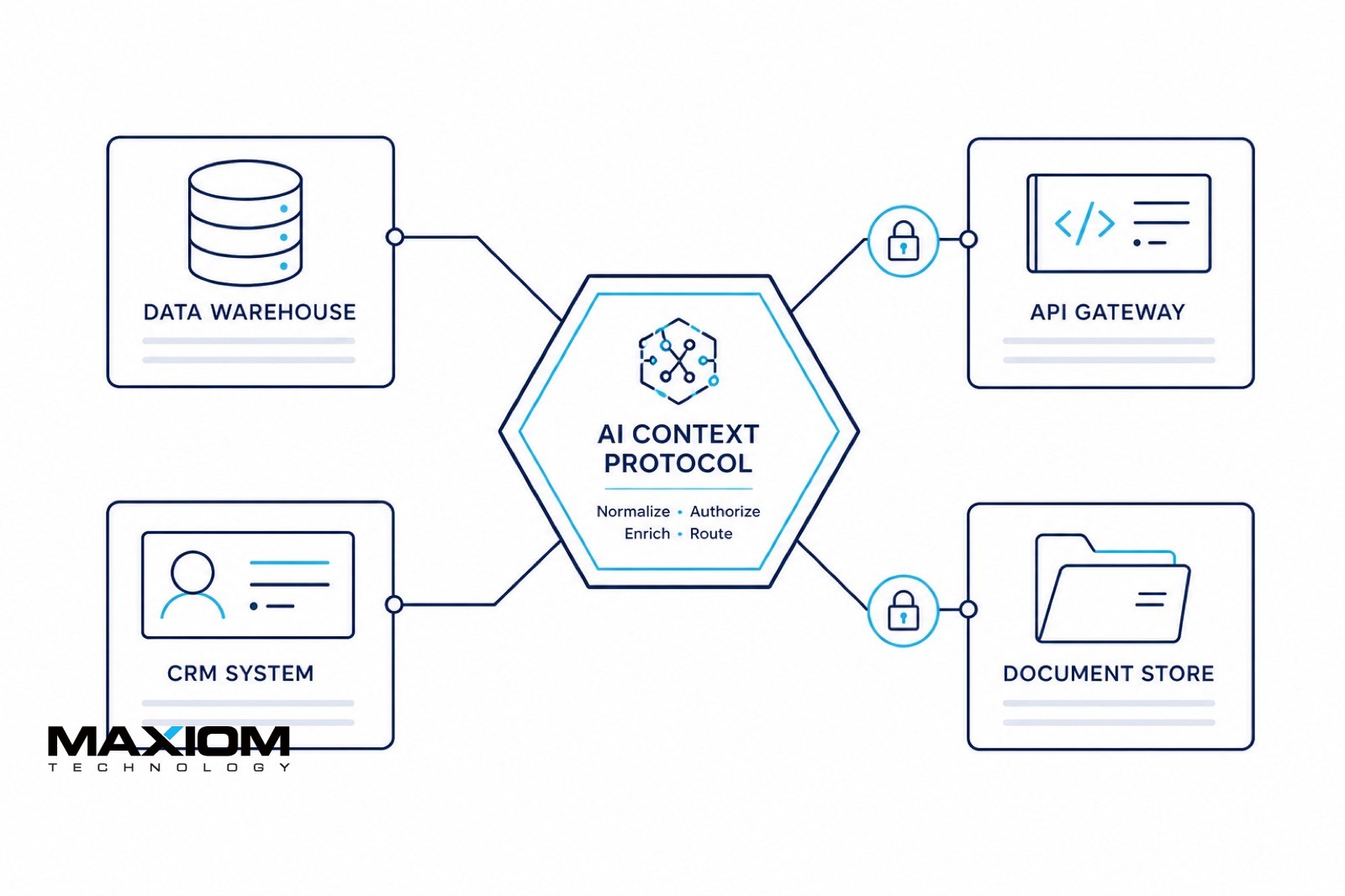
Model Context Protocol (MCP) is an open protocol (originally published by Anthropic) that standardizes how AI applications connect to tools, data sources, and prompts. An MCP server exposes those capabilities so clients such as Claude, Cursor, or a custom agent can call tools, read resources, and use prompts over a consistent interface, instead of a one-off plugin for every system.
That is different from a generic configuration hub or service bus. MCP is specifically about governed model context: which tools the agent may invoke, which files or APIs it may read, and what it is allowed to do next. Production servers for CRM, EHR, ERP, and proprietary APIs are a build problem: see our MCP development service when off-the-shelf connectors are not enough.
Core Capabilities of MCP Servers
Understanding the core capabilities of MCP servers is essential for any team considering adoption. These capabilities form the backbone of what makes MCP servers so powerful for modern development workflows.
- Centralized Coordination: MCP servers unify context across multiple tools and services. Rather than each tool maintaining its own isolated state, the MCP server acts as the single source of truth. This means your IDE, CI/CD pipeline, monitoring stack, and AI assistants all share a coherent view of the system.
- Consistent Configuration: Configuration drift is one of the most common causes of production issues. MCP servers enforce configuration consistency across environments by maintaining a centralized configuration registry that all connected services reference. When a configuration changes, every consumer is notified and updated atomically.
- Scalability: MCP servers are designed to scale horizontally. Whether your team has five developers or five hundred, the protocol handles increased load through connection pooling, request batching, and intelligent caching layers. Most implementations support clustering for high availability.
- Monitoring and Observability: Built-in monitoring capabilities give teams real-time visibility into service health, request patterns, and context propagation. MCP servers expose metrics in standard formats compatible with Prometheus, Grafana, and other observability platforms.
- Data Control and Governance: For enterprise teams, data control is non-negotiable. MCP servers provide fine-grained access controls, audit logging, and data residency enforcement. Teams can specify exactly which context is shared with which services, ensuring compliance with regulatory requirements.
Architecture Layers
A well-designed MCP server implementation consists of several distinct architectural layers, each serving a specific purpose in the overall system.
The Transport Layer handles the raw communication between clients and the MCP server. Most implementations support multiple transport mechanisms including WebSocket for real-time bidirectional communication, HTTP/2 for request-response patterns, and gRPC for high-performance inter-service communication.
The Protocol Layer sits above transport and defines the message formats, sequencing rules, and error handling semantics. This is where the Model Context Protocol specification is implemented, ensuring interoperability between different client and server implementations.
The Context Management Layer is the heart of the MCP server. It maintains the context graph. A structured representation of all the contextual information flowing through the system. This layer handles context merging, conflict resolution, and lifecycle management.
The Integration Layer provides connectors to external services. Pre-built integrations exist for popular development tools, cloud services, and AI platforms. Custom integrations can be built using the MCP server extension API.
Use Cases for Development Teams
MCP servers shine in several key scenarios that modern development teams encounter regularly.
Enterprise Development Teams benefit most from the centralized coordination capabilities. When dozens of developers are working across multiple repositories and services, maintaining shared context becomes critical. MCP servers ensure that when one team updates a shared API contract, every dependent service is immediately aware of the change.
Microservices Architectures are inherently distributed, which makes context propagation challenging. MCP servers solve this by maintaining a context graph that spans service boundaries. Distributed tracing, shared configuration, and cross-service feature flags all become simpler with an MCP server in place.
Cloud Infrastructure Management teams use MCP servers to coordinate infrastructure-as-code deployments, manage secrets rotation, and orchestrate multi-region rollouts. The protocol built-in support for idempotency and atomic operations makes it particularly well-suited for infrastructure automation.
Best Practices for Implementation
Successfully implementing an MCP server requires attention to several best practices that experienced teams have identified.
- Start small: Begin with a single use case rather than trying to centralize everything at once. A common starting point is configuration management or feature flag coordination.
- Invest in schema design: The context schema you define early on will shape how your team interacts with the MCP server for years. Take time to design a schema that is flexible enough to evolve but structured enough to prevent misuse.
- Plan for failure: MCP servers become critical infrastructure quickly. Design your system so that services degrade gracefully if the MCP server is unavailable, using cached context and local fallbacks.
- Monitor context propagation: Use the built-in observability features to track how context flows through your system. Identify bottlenecks and optimize the context graph regularly.
- Secure from day one: Implement authentication, authorization, and encryption from the initial deployment. Retrofitting security onto an MCP server that already has many consumers is significantly harder.
Common Challenges and How to Overcome Them
Adopting MCP servers is not without challenges. Teams commonly encounter issues with context schema evolution, where changing the schema without breaking existing consumers requires careful versioning. The recommended approach is to use additive schema changes and maintain backward compatibility for at least two major versions.
Performance tuning can also be complex, particularly for high-throughput systems. Teams should leverage connection pooling, implement request batching for bulk operations, and use the server built-in caching layer to reduce redundant context fetches.
Finally, organizational adoption often requires a cultural shift. Developers accustomed to managing their own tool configurations may resist centralization. Success requires clear communication about the benefits (reduced configuration drift, faster onboarding, and more reliable deployments) paired with excellent developer experience in the MCP server tooling.
Key Takeaways
- MCP servers centralize context management across tools, services, and team members
- The architecture consists of transport, protocol, context management, and integration layers
- Start with a focused use case and expand as your team gains experience
- Invest in schema design, failure planning, and security from the beginning
- Enterprise teams, microservices architectures, and cloud infrastructure management benefit most from MCP server adoption
If you need production MCP servers for internal systems (not a laptop experiment) read custom MCP servers for enterprise AI. Score identity, least privilege, and audit controls on the MCP exposure checklist before you point a generic server at production. As AI tooling expands into your development workflow, pair protocol work with governance. Read what an AI code audit covers when you need a written findings package for security or compliance stakeholders. If you are choosing among a snapshot, a monthly retainer, and governed MCP, see audit vs oversight vs MCP.