
Building the Rezeo Video Resume App for iOS, Android and Desktop
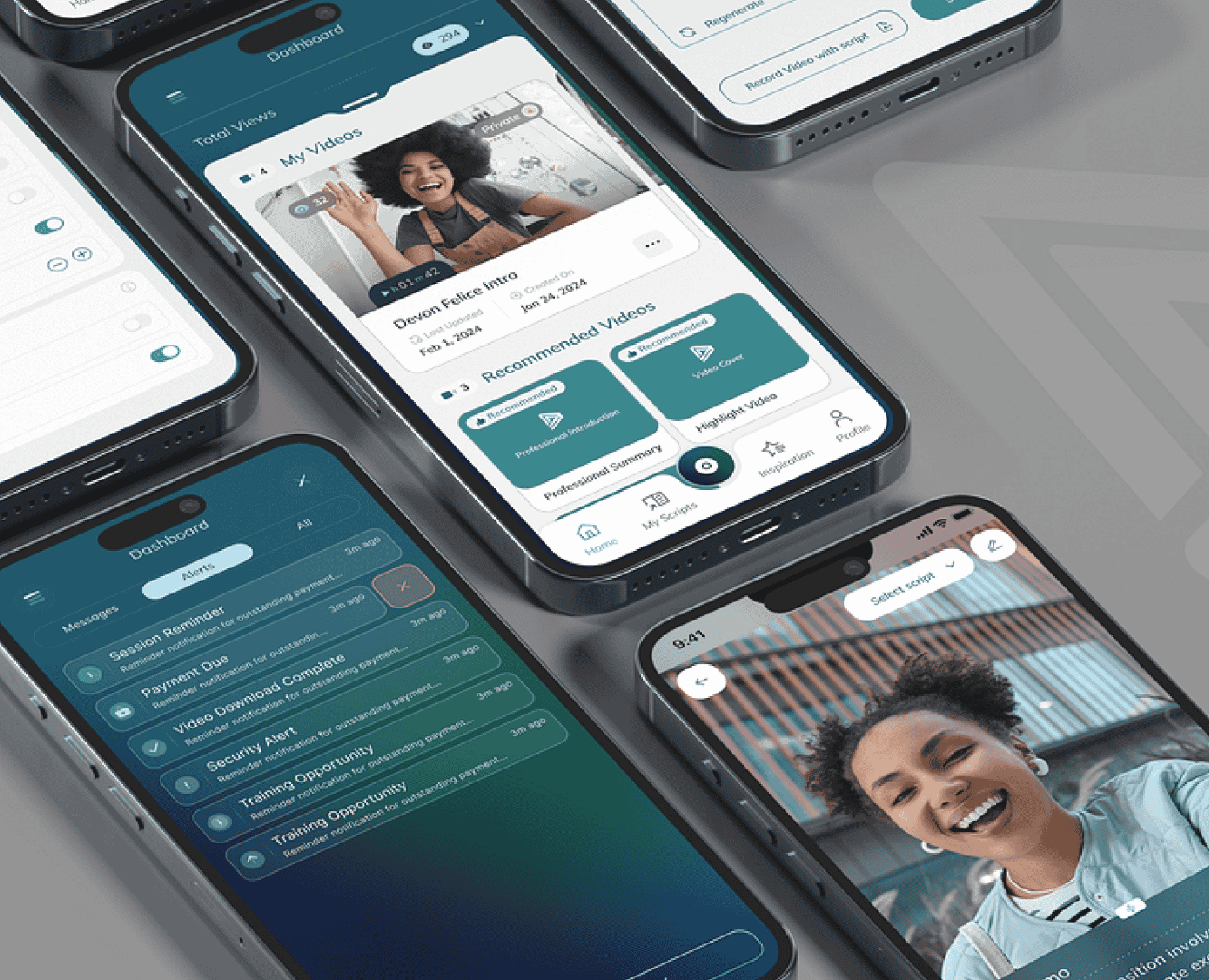
Project overview: a complete video resume platform
Rezeo helps job seekers stand out with video introductions, video cover letters and video messages. We built the entire Rezeo platform: the native iOS app, the native Android app, the desktop version, and the web platform and backend that connect them.
About Rezeo
Rezeo helps job seekers stand out with a short, professional video. People use it for video introductions, video cover letters, and video messages, then add a link to a resume, LinkedIn profile, or cover letter.
The challenge: one video resume app on every device
A video resume only works if it is easy to make. Most people are not comfortable on camera, do not know what to say, and do not want to learn video software. They record on a phone, on a laptop webcam, or at a desk.
Rezeo needed help writing the script, a teleprompter, reliable video hosting with privacy controls, sharing that fits how people apply for jobs, and a way to know when an employer watched. All of that had to feel the same on iPhone, Android, desktop, and the web, with one account across all of them.
What we built for each platform
We built the entire Rezeo platform.
Web platform and backend
The web platform and backend are the foundation every app runs on. They handle accounts, video upload and hosting, and the access settings that let a user decide which videos are public and which stay private. They power one-click sharing by link, email, text message, and LinkedIn InMail, and they send a notification each time a video is watched, showing which video was viewed and when.
The platform also runs Rezeo's AI-powered script generator. A user can upload a resume or answer a few questions and get a draft script, then adjust the tone, style, and length before recording. Staffing agencies get accounts where recruiters invite candidates to record, review the videos, and share them with clients.
Native iOS app
The iPhone app puts the studio in the user's pocket. The home dashboard shows total views and the user's videos, with suggested formats such as a professional summary or a highlight video. A script library holds drafts, and the recording screen lets the user pick a script and read it on the built-in teleprompter while recording with the front camera. An alerts feed and push notifications show when a video has been watched.
Native Android app
The Android app brings the same experience to Android phones: the dashboard, the script library, teleprompter recording, video management and sharing, and notifications when an employer opens a video. Building it natively lets it follow Android conventions.
Desktop version
The desktop version is for people who would rather record at a desk with a webcam and a larger screen. It includes the teleprompter with adjustable scrolling speed and font size, plus a place to manage videos, copy share links into applications, and keep track of views.
One team for every layer
Our team built the iOS app, the Android app, the desktop version, the web platform, and the backend. A video recorded on a phone shows up on desktop, and a view alert reaches the user wherever they are signed in.
Video depends on the device: camera access, recording quality, uploads over a mobile connection, and playback. That is why the mobile apps are native for iOS and Android, on one shared platform. Scripts, videos, sharing settings, and view history live in the same account on a phone, on desktop, or on the web.
A video app or an HR product of your own
Product builds like this are the work of Maxiom Apps, including HR app development and video streaming apps. We also build the web app and backend. To add engineers to your team, you can hire iOS developers and hire Android developers through Maxiom.dev.
Building a video app for mobile and desktop?
Tell us who records, who watches, and which devices they use. On a 30-minute call we will tell you how we would build it and whether we are the right team.
Related
Project inquiry
Tell us what you are trying to ship
Response within 1 business day
The Challenge
Our Solution
Technologies Used
Services Provided
Why Maxiom?
- Software since 2002
- $100M+ in contract value
- 221+ clients
- Top-rated on Clutch
Frequently asked questions
What is a video resume app?
A video resume app helps job seekers record a short video introduction that goes along with their resume. Rezeo also helps write the script, provides a teleprompter, hosts the video, and shares it by link, on iOS, Android, desktop, and the web.
What does the Rezeo app do?
Rezeo lets job seekers create video introductions, video cover letters, and video messages. It includes an AI-powered script generator, a built-in teleprompter, secure video hosting with privacy settings, one-click sharing by link, email, text, or LinkedIn InMail, and a notification each time a video is watched.
Did Maxiom build the whole Rezeo platform?
Yes. We built the native iOS app, the native Android app, the desktop version, and the web platform and backend that keep them in sync.
Why are the Rezeo mobile apps native?
Camera access, recording quality, uploads, and playback depend on the device. Native iOS and Android apps give that control. Scripts, videos, sharing settings, and view history still live in one account across phone, desktop, and web.
How does the teleprompter work?
You pick or paste a script, then adjust the scrolling speed and font size. The script scrolls on screen while you record, so you can keep eye contact with the camera. It works on phones and desktops.
How do staffing agencies use Rezeo?
An agency sets up an account, invites candidates to record video resumes, reviews the videos, and sends them to clients.
How do you know when an employer watches your video resume?
Rezeo sends a notification each time one of your videos is played, showing which video was viewed and when. The mobile app delivers those alerts on the phone, and they are also available on desktop.
Can Maxiom build a video app for iOS, Android, and desktop?
Yes. We build native iOS apps, native Android apps, desktop and web apps, and the backend that ties them together.