
Notify: Brand and UI Design for a Family Driving Safety App
Project overview: designing a family driving safety app
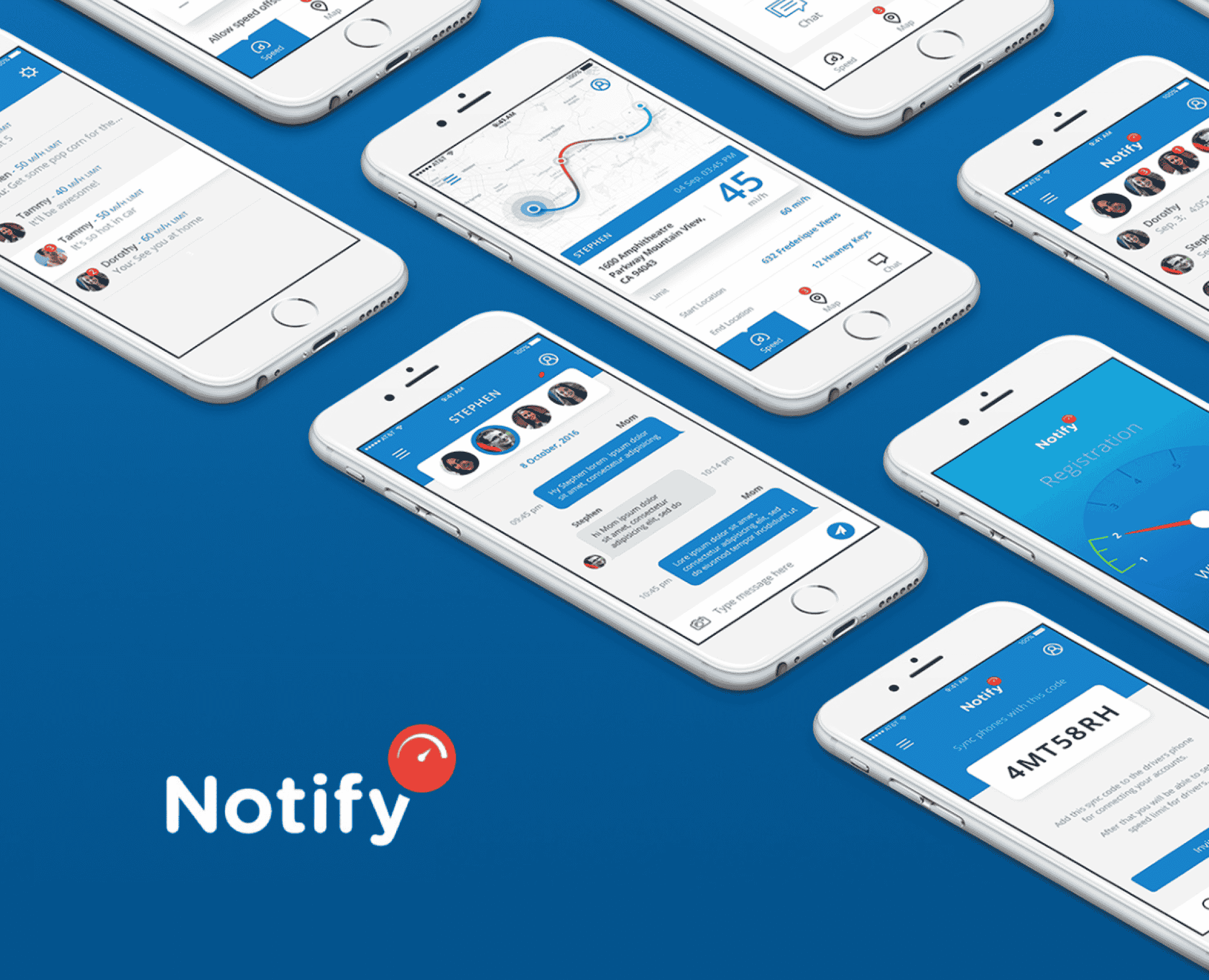
Notify is a road safety app that lets families keep an eye on each other on the road, with each driver's current location and speed. We designed the Notify brand and the app's look: its animation, graphics, colors, iconography and style guide.
What is the Notify app?
Notify is a driving assistant app built around road safety. It lets you keep track of family and close friends while they are on the road, with their current location and speed. The app detects speed, notices when a vehicle is stationary, and recognizes when there may have been an accident. In that case it picks up the person's current location and connects with the nearest help.
The screens in our design show a live speed reading against the speed limit, a map of the trip from start to end, a family chat, and a code that syncs a driver's phone with the family account so speed limits can be set for each driver.
Brand design and UI design
We designed the Notify brand and the look of the app: the animation, graphics, colors, and iconography. We also created the style guide that keeps it consistent, covering fonts, colors, and UI elements.
The goal was to balance illustrations and colors so the app gets its message across quickly. On a safety app, people should understand what is happening before they have read a word.
Safe or in danger, at a glance
The heart of the Notify design is a simple color system. Blue means the person is safe. Red means danger. A parent or partner can open the app and know the situation of the people they care about in a moment.
The Notify logo pairs the name with a red speedometer badge, so speed and safety on the road are clear from the icon alone.
Designing for real-time safety information
- Status first. Speed and safety status are the biggest things on the screen.
- Color with meaning. Color is reserved for safe and danger, so it never becomes decoration.
- Calm by default. Most of the time everyone is safe, so the everyday experience should feel reassuring.
- Works on any screen. The design adapts to different phones so the experience stays familiar.
Mobile app design
We offer UI/UX design, design systems, and digital product design. When the design is ready to build, Maxiom Apps develops automotive and driving apps. To add designers, you can hire UI/UX designers through Maxiom.dev.
Designing a safety, tracking or family app?
Tell us who uses it, what they need to see and how fast they need to see it. On a 30-minute call we will tell you how we would approach the design and the build.
Related
Project inquiry
Tell us what you are trying to ship
Response within 1 business day
The Challenge
Our Solution
Technologies Used
Services Provided
Why Maxiom?
- Software since 2002
- $100M+ in contract value
- 221+ clients
- Top-rated on Clutch
Frequently asked questions
What is the Notify app?
Notify is a road safety app that lets families and close friends keep track of each other on the road, with each person's current location and speed. It detects speed, notices when a vehicle is stationary, and in a possible accident picks up the person's location and connects with the nearest help.
What did Maxiom do for Notify?
We designed the Notify brand and the app's look: animation, graphics, colors, and iconography, plus a style guide covering fonts, colors, and UI elements.
How does Notify show whether someone is safe?
With a simple color system. Blue means the person is safe, and red means danger, so you can see the situation of the people you care about at a glance.
What is a family driving safety app?
A family driving safety app lets family members see each other's location and driving, such as speed, while they are on the road. Notify also alerts family members or emergency help if something goes wrong.
What does app brand design include?
The logo, colors, fonts, iconography, illustration, and motion that give an app its personality, plus a style guide so everyone who works on the app keeps it consistent.
Why does color matter on a safety app?
People need to understand the situation instantly. When color is reserved for meaning, such as blue for safe and red for danger, the screen can be read before any text.
What screens did the Notify design include?
A live speed reading against the speed limit, a map of the trip, a family chat, and a code that syncs a driver's phone with the family account so speed limits can be set for each driver.
Can Maxiom design a mobile app?
Yes. We offer UI/UX design and design systems, and Maxiom Apps builds the product.